 Codeward
WordPress security scanner
Your firewall guards the door. Codeward reads the code.
Codeward checks every plugin, theme and WordPress core file the way a security auditor would: known CVEs, malware, modified files and risky settings. Each finding comes with a plain-English explanation, the line it is on, and how to fix it.
What every scan checks
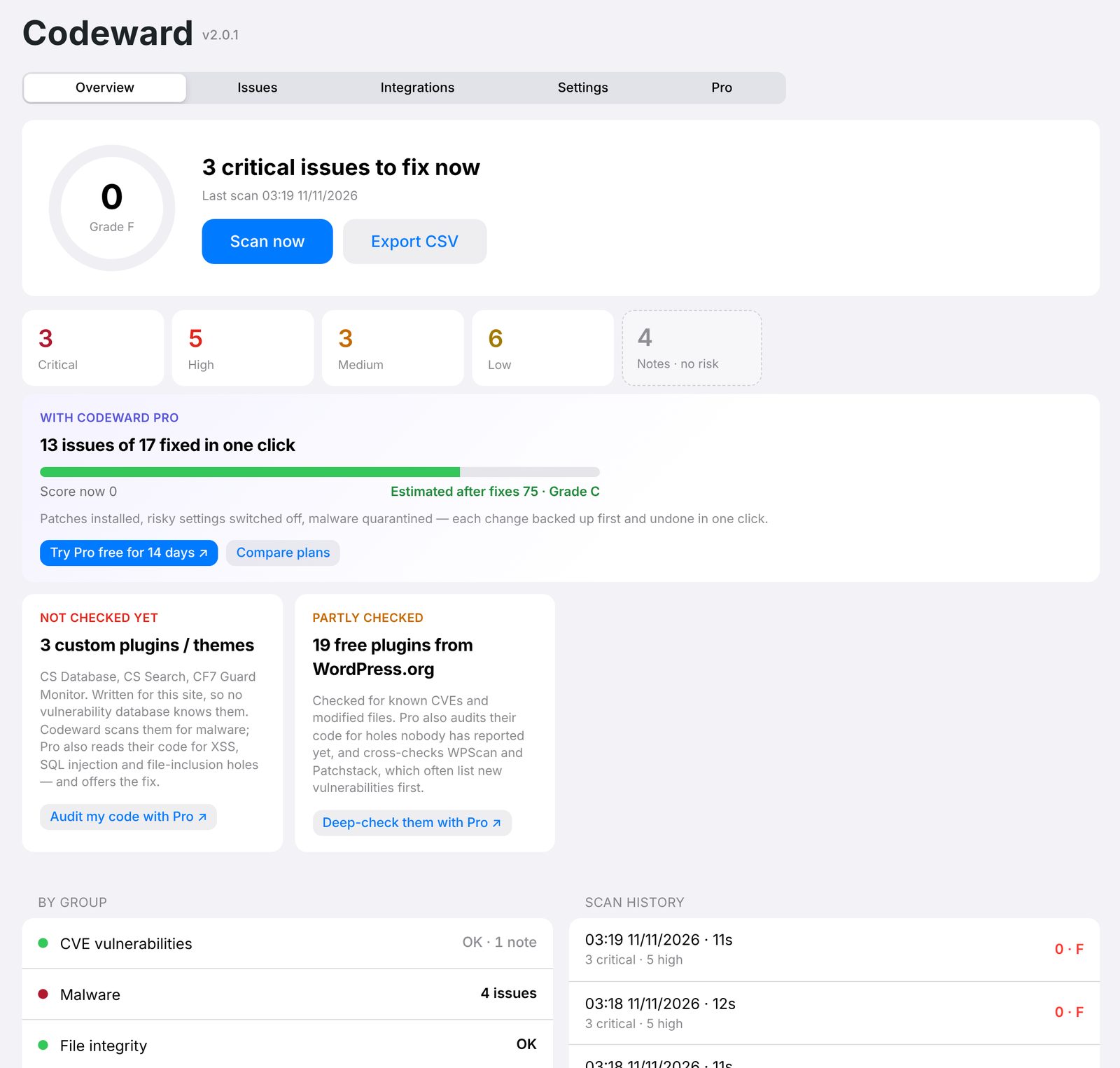
Six areas, one score you can act on
Scans run in small chunks, so even large sites never time out. Notes and tips never lower your score; only real risks do.
Known vulnerabilities
Every plugin, theme and WordPress version is matched against Wordfence Intelligence (free key) or WPVulnerability (no key).
Malware & backdoors
30+ signature groups: webshells, password backdoors, hidden admins, obfuscated loaders, injected JavaScript, PHP hidden in images.
Core & plugin integrity
Files that differ from the official WordPress.org release, plus unknown PHP files in wp-admin and wp-includes.
Configuration
XML-RPC, username enumeration, version leaks, security headers, public debug.log and backups, PHP running in uploads, weak salts.
Accounts
Guessable admin usernames, too many administrators, admins created recently, usernames shown on posts.
Updates & permissions
Missing updates, unused plugins left on the server, end-of-life PHP, files other users on the server can read or write.
Free
Your security score, in plain English
See what is wrong, how serious it is and where it is. Open any flagged file with the suspicious line highlighted, and compare plugins and core files with the WordPress.org original.
- Weekly automatic scans with an email when something critical appears
- Ignore false positives; they stay out of the score and the alerts
- Export to CSV, works on Multisite
From warning to fixed
Three steps, and you choose who does the last one
Find every problem
One click, or automatically every week. Codeward checks the whole site and ranks what it finds by real risk.
Read it like a person would
What is wrong, why it matters and the exact line, written for site owners. Step-by-step instructions if you fix it by hand.
Fix it in one click
Install the patch, switch off the risky setting, quarantine the file. Each change is backed up first and can be undone from Fix history.
Codeward Pro · code analysis
The holes no database knows about yet
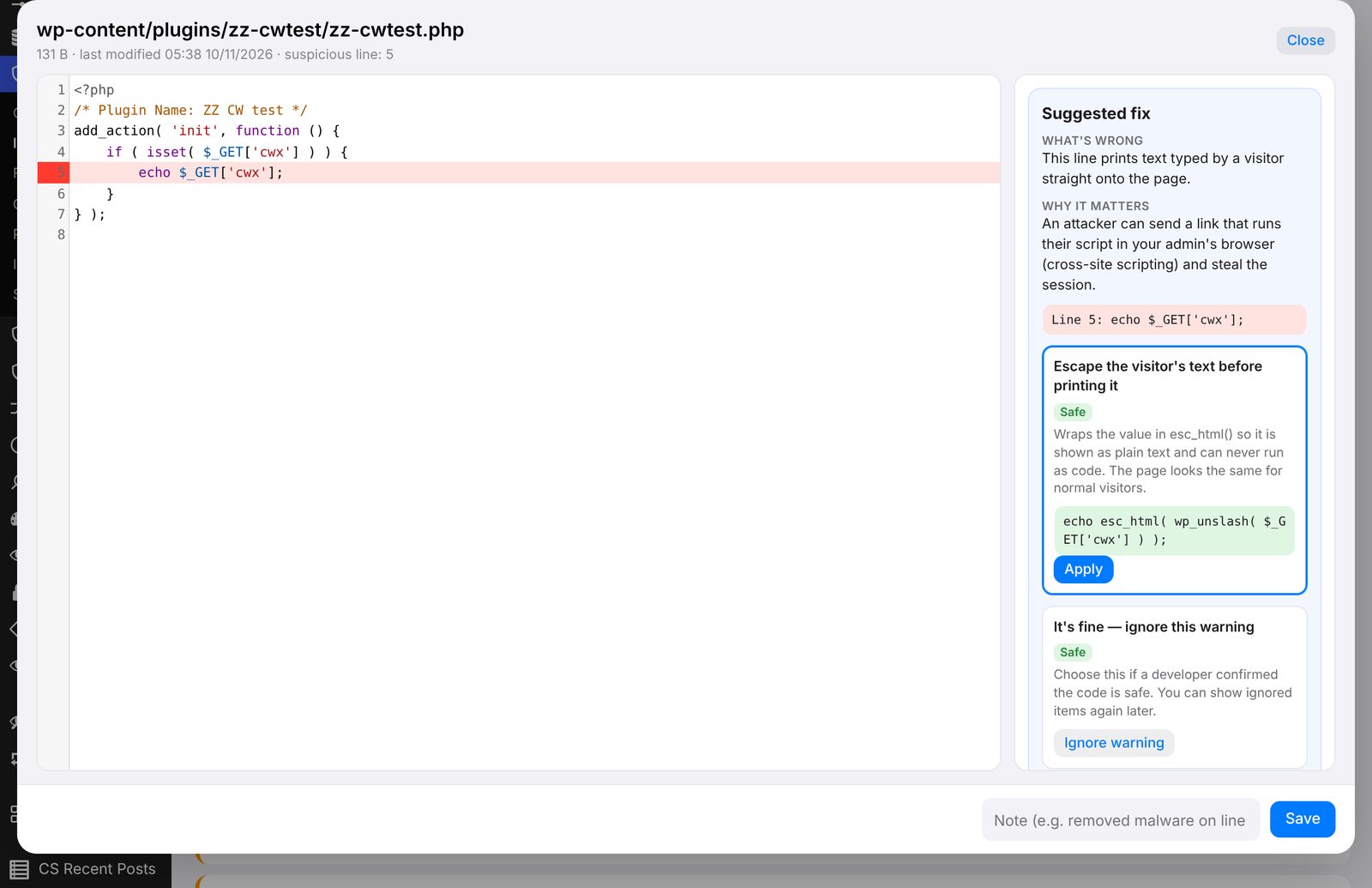
Plugins written for one site rarely get a CVE. Codeward Pro reads their code and follows user input to where it ends up, so it can tell a real hole from safe code.
- XSS, SQL injection, file inclusion, SSRF, CSRF, open redirects, object injection
- REST routes and AJAX actions without permission checks
- A ready-made fix for the line, checked for syntax errors before it is saved
- Can audit plugins from WordPress.org too
Integrations
Works with the services you already trust
Each service adds its results to the same list, score and alerts. Only fingerprints (SHA-256), your domain, or plugin names and versions are sent. File contents never leave your server.
Service names are trademarks of their owners. Codeward connects to these services with your own key or account; it is not affiliated with or endorsed by them.
Questions
Before you install
Does Codeward replace my firewall?
No. A firewall blocks attacks as they happen; Codeward finds and explains the weak spots they would use. Run both.
Will a scan slow down my site?
No. Scans run a few hundred files at a time, and scheduled scans run at night. With Pro, rescans only re-check files that changed.
Does the free plugin change anything on my site?
No. It only reads. It shows what to fix and how. One-click fixes, each backed up first, are part of Codeward Pro.
What is sent to other services?
Nothing, until you switch a service on in Integrations. Then only what that service needs: plugin names and versions, your domain, or file fingerprints.
Scan your site in five minutes
Free on WordPress.org. No account, no key needed to start.